Why choosing the right platform matters
Picking the right platform for your website is one of the decisions that quietly makes or breaks a project. WordPress has been the most widely used CMS in the world for years, but Webflow keeps winning people over with its simplicity, visual editor and modern design capabilities. In this article I compare both platforms from the perspective of small businesses and freelancers, with concrete examples from real projects.
Webflow and WordPress at a glance
Webflow is a cloud platform for building websites with a visual editor that lets designers and non-coders alike create modern sites without writing code. WordPress is an open-source CMS you can run on your own hosting and extend with thousands of plugins and themes.
Side-by-side comparison of key features
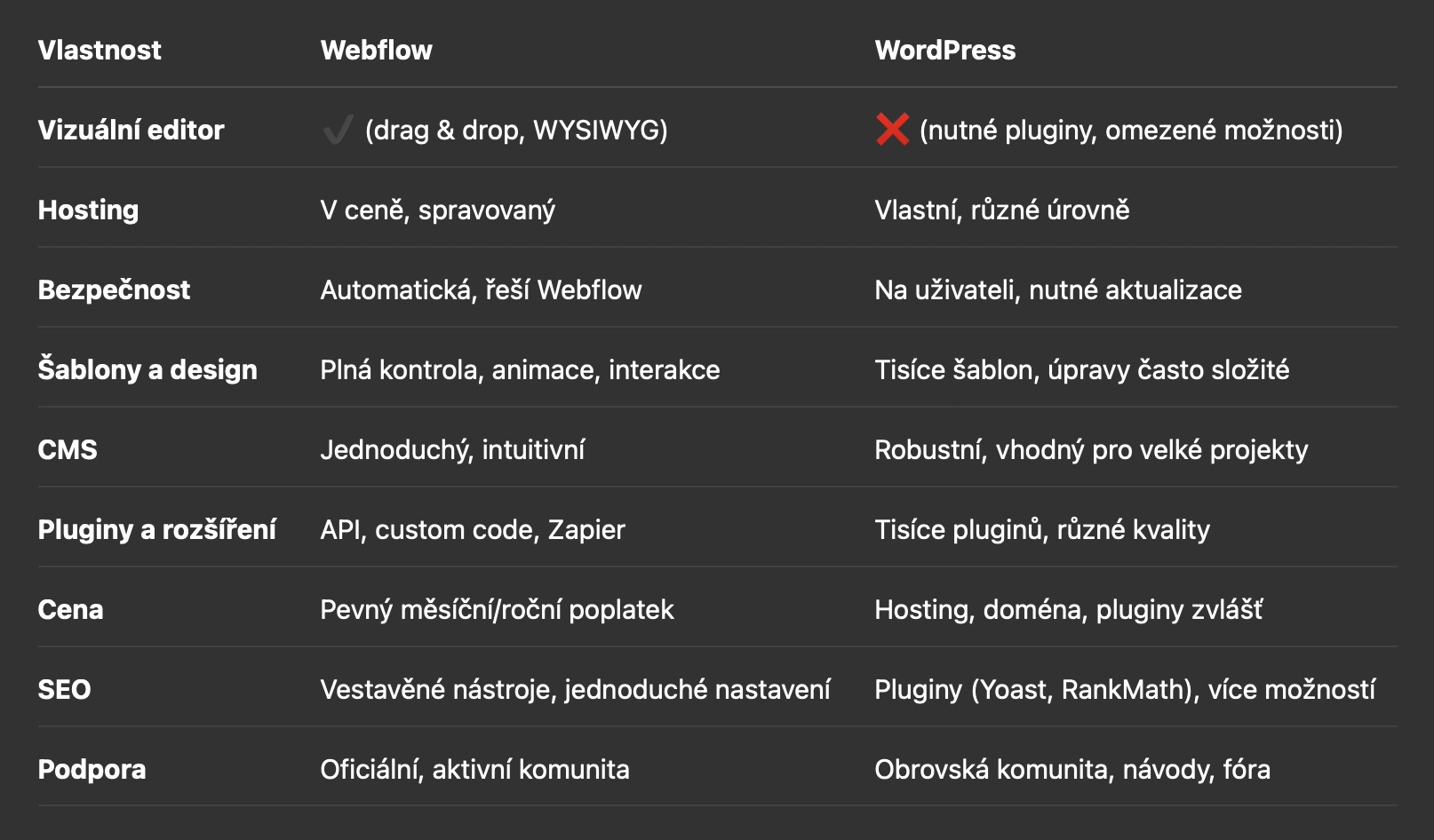
Ease of use – real-world scenarios
- Webflow: A freelancer wants to spin up a portfolio fast – within a few hours they have a finished, modern site without touching code.
- WordPress: A small business needs a blog and an online store – they grab a theme, but then have to deal with plugins, security and updates.
Design and customization options
Webflow lets you fine-tune the design directly in the editor, including animations and interactions. WordPress offers thousands of themes, but customizing them is often limited or requires CSS/HTML knowledge. For a truly unique design, Webflow is faster and more flexible.
Content management and CMS
- Webflow: Ideal for smaller blogs, portfolios and company presentations. Easy for clients to manage.
- WordPress: A good fit for large magazines, community sites and complex projects.
Price and running costs – concrete examples
- Webflow: A portfolio with a custom domain and CMS – roughly USD 16–23/month, everything included.
- WordPress: A blog on your own hosting – USD 3–10/month for hosting + domain + plugins (some paid), which often adds up to USD 10–30/month.
Security and updates
Webflow handles security and updates automatically. With WordPress you have to regularly update the core, themes and plugins, otherwise you're exposed to security risks. For small businesses, Webflow is the more worry-free option.
Community and support
- Webflow: Official support, Webflow University, an active community on the forum and Facebook.
- WordPress: A huge community, thousands of tutorials, forums and local Facebook groups.
Migration scenarios between platforms
- From WordPress to Webflow: Export content to CSV, import into Webflow CMS, rebuild the design, set up URL redirects.
- From Webflow to WordPress: Export static HTML, migrate content manually, configure plugins.
Who is each platform right for?
- Webflow: Ideal for designers, freelancers and small businesses that want a modern site without worrying about maintenance and security.
- WordPress: A good fit for projects that need maximum flexibility, custom extensions and integrations.
Tips and recommendations
- If you want a fast start, modern design and minimal hassle, go with Webflow.
- If you're planning a large site, a community portal or you need specific plugins, consider WordPress.
- Always clarify upfront which features and extensions you'll actually need.
Conclusion
Both platforms have their place. Webflow is great for a fast, modern and worry-free solution. WordPress offers maximum control and extensibility, but it demands more care. The right choice comes down to your specific needs and experience.